Uptime Kuma 是一款易于使用的自托管监控工具。

2025-12-31 16:03

Uptime Kuma
Uptime Kuma 是一款易于使用的自托管监控工具。
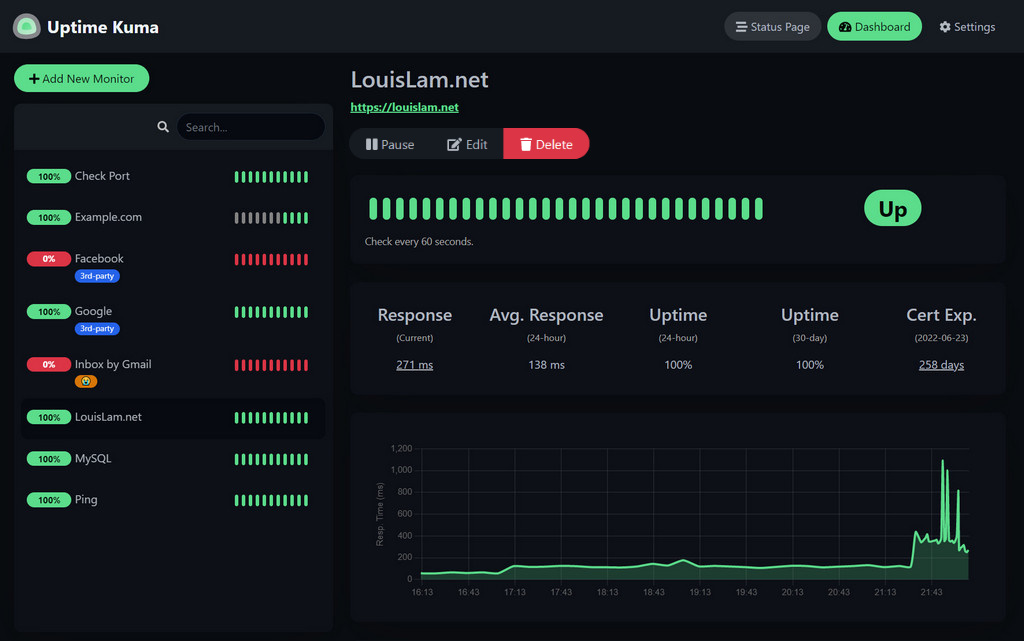
🥔 在线演示
试试吧!
演示服务器(地点:德国法兰克福):https://demo.kuma.pet/start-demo
这是一个临时的在线演示,所有数据将在10分钟后删除。由Uptime Kuma Sponsors赞助。
⭐ 特点
- 监控 HTTP(s) / TCP / HTTP(s) 关键字 / HTTP(s) JSON 查询 / WebSocket / Ping / DNS 记录 / 推送 / Steam 游戏服务器 / Docker 容器的正常运行时间
- 精美、响应迅速、运行流畅的用户界面/用户体验
- 可通过 Telegram、Discord、Gotify、Slack、Pushover、电子邮件 (SMTP) 以及90 多种通知服务接收通知,点击此处查看完整列表
- 20秒间隔
- 多语言
- 多个状态页面
- 将状态页面映射到特定域
- Ping 图表
- 证书信息
- 代理支持
- 双因素身份验证支持
🔧 如何安装
🐳 Docker Compose
mkdir uptime-kuma
cd uptime-kuma
curl -o compose.yaml https://raw.githubusercontent.com/louislam/uptime-kuma/master/compose.yaml
docker compose up -d
Uptime Kuma 现在在所有网络接口上运行(例如http://localhost:3001或http://your-ip:3001)。
警告
不支持NFS(网络文件系统)等文件系统。请映射到本地目录或卷。
🐳 Docker 命令
docker run -d --restart=always -p 3001:3001 -v uptime-kuma:/app/data --name uptime-kuma louislam/uptime-kuma:2
Uptime Kuma 现在在所有网络接口上运行(例如http://localhost:3001或http://your-ip:3001)。
如果您只想将访问权限限制在本地主机:
docker run ... -p 127.0.0.1:3001:3001 ...
💪🏻 非 Docker
要求:
- 平台
- ✅ 主流 Linux 发行版,例如 Debian、Ubuntu、Fedora 和 ArchLinux 等。
- ✅ Windows 10 (x64)、Windows Server 2012 R2 (x64) 或更高版本
- ❌ FreeBSD / OpenBSD / NetBSD
- ❌ Replit / Heroku
- Node.js 版本>= 20.4
- Git
- pm2 - 用于在后台运行 Uptime Kuma
git clone https://github.com/louislam/uptime-kuma.git
cd uptime-kuma
npm run setup

# Option 1. Try it
node server/server.js

# (Recommended) Option 2. Run in the background using PM2
# Install PM2 if you don't have it:
npm install pm2 -g && pm2 install pm2-logrotate

# Start Server
pm2 start server/server.js --name uptime-kuma
Uptime Kuma 现在在所有网络接口上运行(例如http://localhost:3001或http://your-ip:3001)。
更多有用的 PM2 命令
# If you want to see the current console output
pm2 monit

# If you want to add it to startup
pm2 startup && pm2 save
高级安装
如果您需要更多选项或需要通过反向代理浏览,请阅读:
https://github.com/louislam/uptime-kuma/wiki/%F0%9F%94%A7-How-to-Install
🆙 如何更新
请阅读:
https://github.com/louislam/uptime-kuma/wiki/%F0%9F%86%99-How-to-Update
🆕接下来是什么?
我会将请求/问题分配到下一个里程碑。

![[软路由]爱快iKuai企业版3.7.19巩固X86插件版开心版](https://forum.naixi.net/static/image/hrline/5.gif)






全部评论